Your agent clones the style of any reel onto your footage.
mimic-mcp studies a reference reel frame by frame — cuts, transitions, captions, beats — then rebuilds that style around your footage and script with Remotion, and reviews its own render against the original until it matches.
$ claude mcp add mimic-mcp -- npx -y mimic-reels-mcp
Works with Claude Code, Codex, Cursor, Gemini CLI — any MCP client. Node 18+ and ffmpeg required.
REC · 9:16
3toolsthatchangedeverything
The loop
Measure. Rebuild. Render. Self-review.
The agent never guesses at a style — it measures the reference, writes a machine-readable style spec, and diffs its own render against it.
01 · analyze_referenceStudy the reference
Scene cuts, fingerprinted transitions, in-shot motion, OCR'd captions, musical beats — plus filmstrips so even 2-frame flashes are visible to the agent.
02 · scaffold_reelWrite the recipe
The agent describes the new reel as plain JSON — your footage, your script, the reference's timing — and scaffolds a ready-to-edit Remotion project.
03 · render_reelRender the video
Draft renders for fast iteration, full-resolution for the deliverable. Remotion handles the pixels; the agent handles the taste.
04 · review_renderCritique itself
The render goes through the same analyzer as the reference. The diff becomes a 0–100 fidelity score with issues that name the exact recipe field to fix.
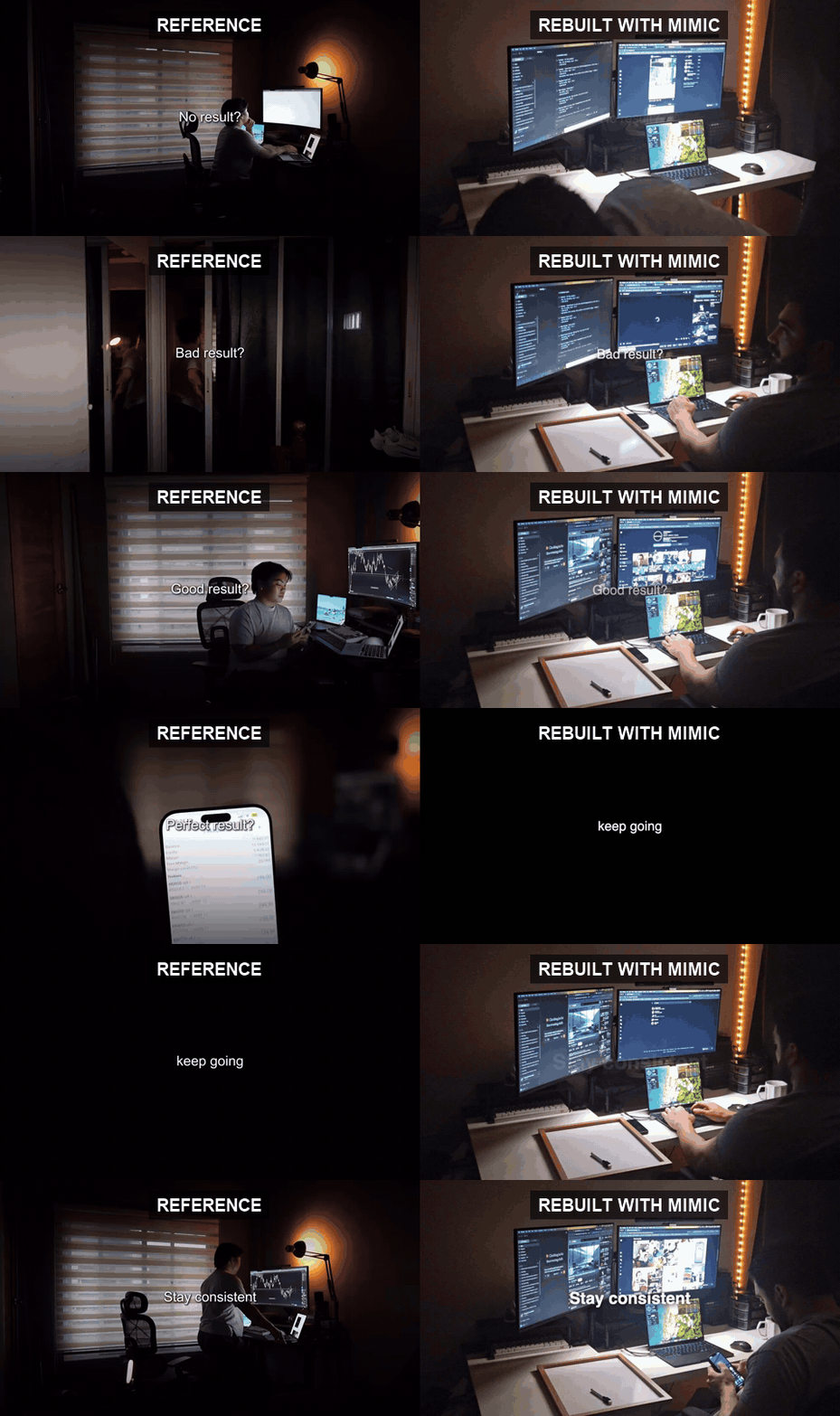
Left: a reel the user liked (someone else's). Right: what the agent generated from the user's own footage and a one-line script — same pacing, same layout, same music.
The toolbox
Twelve tools, one workflow.
Everything the agent needs to go from "make it look like that" to an mp4 — plus a /mimic-mcp slash-command prompt that walks it through the whole flow.
studyanalyze_reference
Measures the reel into a style spec: cuts, transitions, motion, captions, beats.
studytranscribe_reference
Word-level transcript of the reference, so the agent sees hook → build → payoff.
studyextract_music
Rips the soundtrack so the new reel can use the same music.
preptrim_silence
Cuts silent gaps out of talking-head footage into a tight jump-cut clip.
prepgenerate_voiceover
Script → spoken voiceover with the built-in macOS voice. No API key.
buildscaffold_reel
Style recipe in, ready-to-edit Remotion project out.
buildrender_reel
Renders to mp4 — draft for speed, final for the deliverable.
buildreview_render
Diffs the render against the reference into a fidelity score and fixes.
buildopen_in_studio
Human handoff: preview and tweak every field in Remotion Studio.
shipexport_variants
Re-frames the finished reel to 9:16, 1:1, 4:5, 16:9 for cross-posting.
reuselist_presets / get_preset
Browse reusable style presets — built-ins plus your own.
reusesave_preset
Capture a style you nailed as a named preset for future reels.
Quickstart
Hooked up in one command.
Install ffmpeg, point your agent at the published package, and ask for a reel. No clone, no build.
# prerequisites (macOS — see README for Windows/Linux)
brew install ffmpeg

# add the server
claude mcp add mimic-mcp -- npx -y mimic-reels-mcp

# then, inside Claude Code:
/mimic-mcp  my-screen-recording.mov  script.txt  reference-reel.mp4
It's a standard stdio MCP server. Any client that takes a command + args:
command: npxargs: [-y, mimic-reels-mcp]
Hacking on it instead? Clone, npm install && npm run build, and use node dist/index.js — see CONTRIBUTING.md.
The contract
One JSON recipe between taste and pixels.
The style recipe is what the agent writes after studying the reference — and what the renderer consumes. Everything past caption is optional; a minimal segment is just start, end, and text.
Karaoke & typewriter captions with per-word timings from transcription
Ken-Burns punch-ins with focus points and fitted easing
Multi-clip montages — each segment can bring its own footage
Transition sounds — pop, click, whoosh, riser, or your own file
Validated up front — scaffold_reel rejects a bad recipe before you render
Reels from the community — style copies and fully generated from-scratch pieces. Audio is stripped from showcases; the design is the point.
SaaS ad, zero footageThe agent studied a payments-app ad as a design brief, then wrote four Remotion scenes from scratch — feature pills, a rings interlude, a terminal product shot, a wordmark finale — timed to the reference's measured cuts.Lyric reel, player chrome rebuiltCopied from a 35s screen recording: a karaoke lyrics panel highlighting line by line, a floating album-art card, a mini now-playing card and a transport bar — all rebuilt as Remotion scenes over the video background, held to the reference's timing.
MIT-licensed, CI on every push, documented architecture, and a clear trust model. Issues and PRs welcome — the presets/ folder is an easy first contribution.